Batch & Bulk File Renaming Software for Windows

Rename Thousands of Files at Once — in Seconds

Advanced File Renamer lets you rename any number of files individually or in a single batch using find & replace, sequential numbering, date stamps, EXIF photo data, ID3 music tags and regular expressions. See every change in the live preview before you apply it - then undo anything with one click. One-time purchase. Runs 100% on your Windows PC.

Get Advanced File Renamer - $29.95
One-time payment.
No subscription. Ever.
Windows 7 / 8 / 10 / 11
Rename unlimited files in one batch
Full undo - reverse any rename instantly
Live preview before you commit
One-time purchase - no subscriptions
10+
Rename Rule Types Built In
8
No Limit on Files Per Batch
50+
Supported File Types & Formats
$29.95
One-Time Price - Yours Forever
Core Features

Every Renaming Tool You Will Ever Need - in One Application

Whether you need to rename a single file or half a million, Advanced File Renamer has the rules, filters and safeguards to get the job done right the first time - without touching the command line.

Find & Replace in Filenames

Search for any text, character or pattern inside a filename and replace it with something else - across every file in the batch simultaneously. Supports case-sensitive and case-insensitive matching. The fastest way to fix systematic naming mistakes across an entire folder in seconds.

Sequential and Automatic Numbering

Add auto-incrementing sequential numbers to any position in the filename - prefix, suffix, or anywhere in between. Set the starting number, step size, padding width and separator. Ideal for organising photo shoots, scanned documents, episode files, product images or any numbered series.

Date and Timestamp Renaming

Rename files using the file's own creation date, last modified date, or date accessed - formatted in any pattern you choose (YYYY-MM-DD, DD-MMM-YYYY, custom separators). Combine date tokens with prefixes, suffixes and sequence numbers to build consistent, sortable filenames automatically.

EXIF Photo Data Renaming

Rename JPG, PNG, TIFF and RAW image files using the metadata your camera embeds in every photo. Build filenames from Date Taken, Camera Make and Model, Focal Length, ISO, GPS Location and more. Finally bring order to years of holiday photos and camera roll dumps without opening a single file manually.

ID3 Tag Renaming for MP3 Files

Rename MP3, FLAC, AAC and OGG files using the embedded ID3 metadata tags - Artist, Album, Track Number, Title, Year and Genre. Build a perfectly organised music library using any filename template you like. Handles entire album folders or scattered individual tracks with equal ease.

Regular Expression (Regex) Support

Write any regular expression pattern to match and transform filenames with pinpoint precision. Capture groups let you rearrange parts of the filename, strip complex patterns, extract numbers, reorder date components, fix episode naming conventions and handle any renaming task that simpler tools cannot.

Case Conversion

Convert filenames to UPPERCASE, lowercase, Title Case or Sentence case in one operation. Mix case conversion with other rules - for example, find and replace then apply title case - to clean up inconsistently named files from multiple sources in a single batch run.

Live Preview Before You Rename

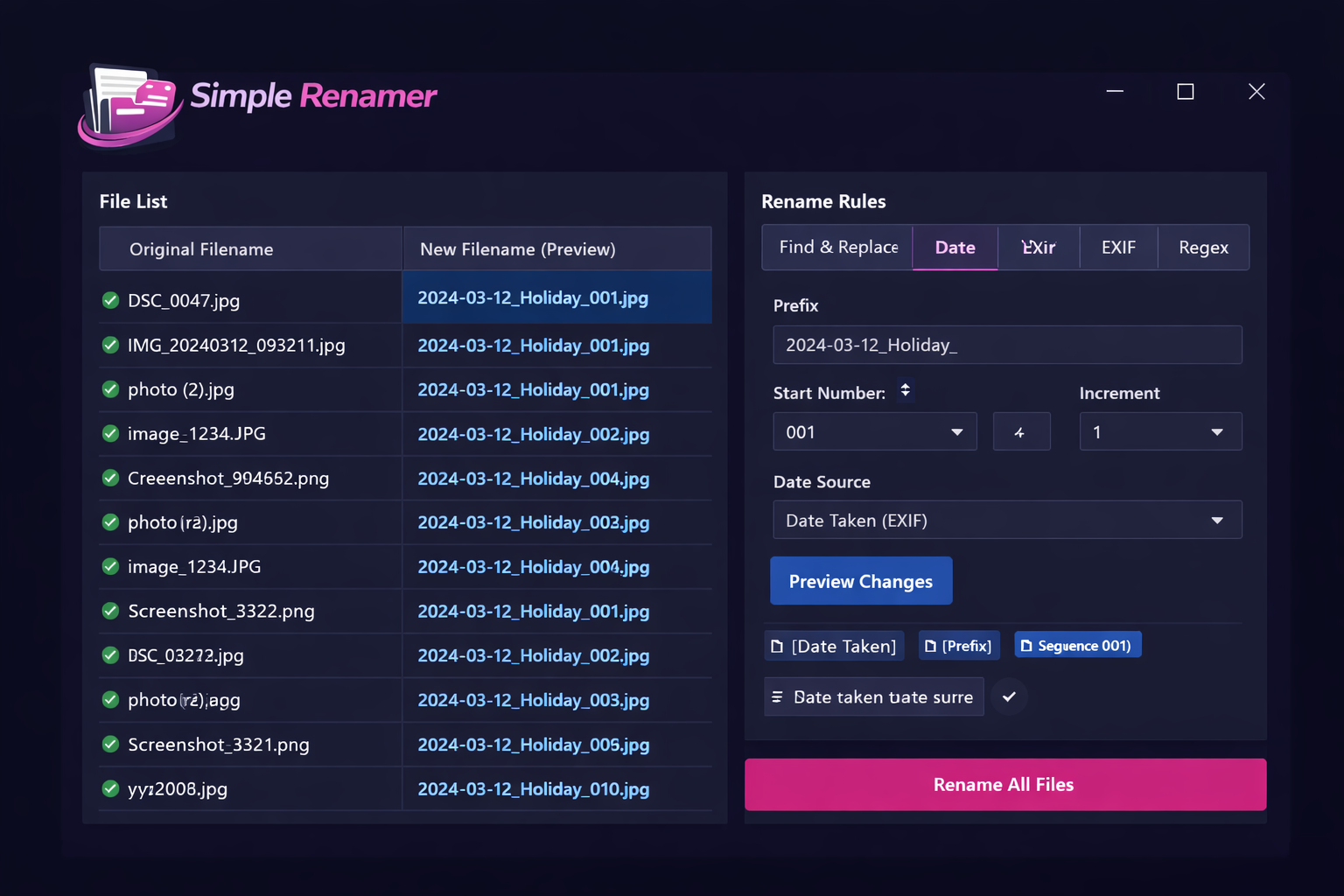
See the before and after filename for every file in the list as you build and adjust your rules. Nothing is changed on disk until you click Apply. The preview updates in real time as you tweak any setting, so you can iterate quickly and rename with complete confidence that every result is exactly right.

Undo Any Rename - Instantly

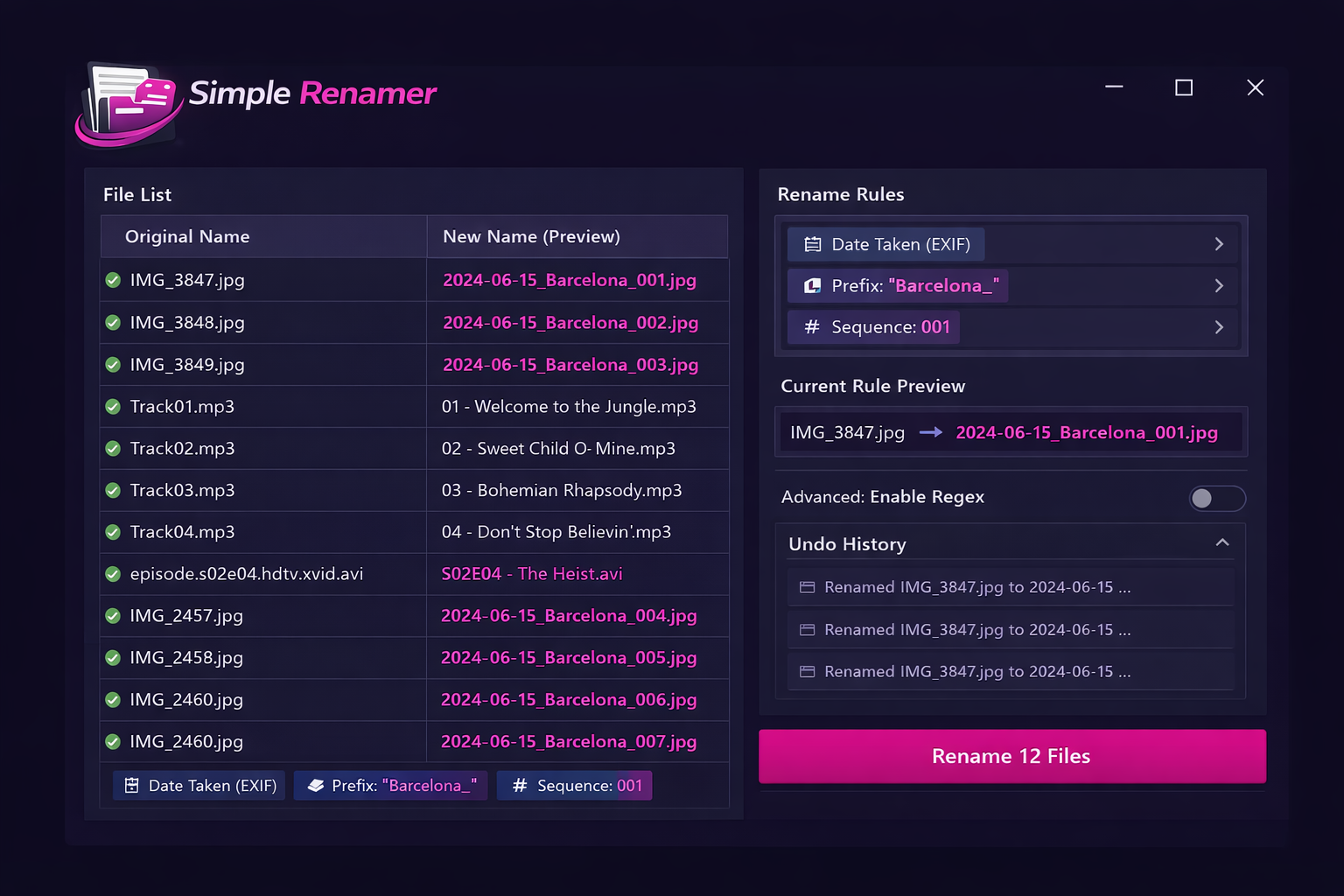
Every rename operation Advanced File Renamer performs is logged to a full undo history. Made a mistake? Click Undo and every file reverts to its original name immediately - no manual tracking, no command-line rollback, no panic. The most important safety net in any bulk file tool.

Subfolder and Recursive Renaming

Process files inside a single folder or recurse through the entire subfolder tree in one operation. Apply your rename rules to files nested any number of levels deep while preserving folder structure. Filter by file extension to target only the file types you want - leave everything else untouched.

Trim, Remove and Clean Filenames

Strip leading or trailing spaces, remove illegal characters, delete specific character positions, cut a set number of characters from the start or end, or remove everything that matches a pattern. Clean up messy downloads, camera names, scanner output and auto-generated filenames in seconds.

Stacked and Combined Rename Rules

Chain multiple rename rules together and apply them all in one pass. Find and replace, then add a date prefix, then apply title case, then append a sequence number - all in a single batch operation. Build named rule presets and reuse them on any folder with one click.
Built for Every File Renaming Job You Face

Photo & Camera Roll Sorting MP3 & Music Library TV Show Episodes Scanned Documents RAW Camera Files Product Images Download Folder Cleanup Work Project Files Video & MKV Collections Regular Expressions Sequential Numbering Date & Timestamp Rules
Simple 4-Step Process

How to Rename Hundreds of Files at Once in 4 Simple Steps

No command line. No scripting. If you can drag a folder onto a window you can rename your entire file collection in minutes.

Load Your Files or Folder

Drag individual files, a whole folder, or an entire subfolder tree into Advanced File Renamer. Use the built-in browser to navigate your drive or paste a folder path directly. Filter by extension to target only the file types you need.

Build Your Rename Rules

Choose from find & replace, sequential numbering, date patterns, EXIF metadata, ID3 tags, regex, case conversion, trim and more. Stack multiple rules together and apply them all in a single pass. Save any combination as a named preset for next time.

Preview Every Change

The live preview panel shows the original and new filename side by side for every file in the list - updating in real time as you adjust any rule. Nothing is renamed until you are satisfied with the results and click Apply.

Apply and You Are Done

Click Rename and Advanced File Renamer processes every file in the batch instantly. The undo log captures the full operation so you can reverse everything with one click if you ever need to. Your files are renamed, sorted and ready.

Advanced File Renamer showing a split view with the original messy filenames on the left and the clean renamed preview on the right, with stacked rename rules and undo history visible
One Tool. Every File Type. No Monthly Fee.

Stop Renaming Files One at a Time

Whether you are a photographer tidying a holiday shoot, a collector sorting a music library, a sysadmin batch-processing server logs, or someone who just has a folder of badly named downloads - Advanced File Renamer handles the whole job in one run, running 100% locally on your Windows PC.

  • Rename individual files or entire folder trees in a single batch
  • Find & replace, dates, EXIF, ID3, regex and sequential numbering
  • Stack multiple rules - apply them all in one pass
  • Full live preview before any file is touched on disk
  • One-click undo - reverse any batch rename instantly
  • 100% offline - your files never leave your computer
  • Save rule presets and reuse them on any folder in future
Start Renaming Files in Bulk
User Reviews

What Users Are Saying About Advanced File Renamer

"I shoot real estate photography and come back from every job with 200 to 400 images named IMG_something by the camera. After my first shoot I had Advanced File Renamer set up with a rule that renames each photo to PropertyAddress_RoomName_001.jpg using a CSV lookup. It now takes about 30 seconds to rename a full shoot that used to take me 20 minutes."

Sarah T.
Real Estate & Commercial Photographer

"I have around 80,000 MP3 files across about 4,000 albums and the naming was completely inconsistent — some by artist, some by track number, some by album. The ID3 tag rename feature in Advanced File Renamer let me run the whole library through a single template in one overnight batch. Every file is now named identically and my music player can actually find everything."

Daniel W.
Music Collector & DJ

"Our company generates hundreds of PDF invoices and reports every month with inconsistent naming from three different systems. Advanced File Renamer's regex engine lets me write one pattern that catches all three formats and normalises them into our standard convention. The undo log has saved me twice when I got a regex wrong. Genuinely indispensable for our IT workflow."

Marcus O.
IT Administrator & Systems Manager
Pricing

One Price. Unlimited Files. No Monthly Fee.

Pay once and own Advanced File Renamer forever. Every feature included, all rule types, free software updates - no subscription, ever.

Best Value - One-Time Purchase
Advanced File Renamer batch file renaming software product box for Windows
$29.95

One-time payment - instant download after purchase

  • Find & replace, sequential numbering, date and regex rules
  • EXIF photo data and ID3 music tag renaming
  • Batch rename unlimited files - subfolders included
  • Live preview + one-click undo for every operation
  • 100% offline - your files never leave your PC

Complete Your Purchase

Enter your details below and click the button to pay securely via PayPal. Your download link appears instantly after payment.


Payment processed securely by PayPal
256-bit SSL encryption
Download link delivered instantly after payment
No subscription - one-time payment only
Free software updates included
FAQ

Common Questions About Advanced File Renamer

Can I rename thousands of files at once?

Yes. Advanced File Renamer processes entire folders and subfolders in a single batch with no practical limit on the number of files. Whether you are renaming 50 photos or 200,000 server log files, it runs the same way. Users regularly process tens of thousands of files in one operation.

How does the find and replace renaming work?

Type the text you want to find in filenames and the text you want to replace it with. Advanced File Renamer scans every filename in your file list, finds each match and replaces it. You can match case-sensitively or case-insensitively, and you can use regular expressions for more complex pattern matching. The live preview shows the result for every file before you apply the change.

Can I rename photos using their EXIF date and camera data?

Yes. The EXIF renaming module reads metadata embedded in JPG, PNG, TIFF and RAW image files and lets you build filenames using Date Taken, Camera Make and Model, Focal Length, ISO, Shutter Speed, Aperture and GPS Location. This is the fastest way to organise large photo libraries - rename an entire year of camera roll images into a consistent date-based naming convention in one batch run.

Can I rename MP3 and music files using their ID3 tags?

Yes. Advanced File Renamer reads ID3 tags from MP3, FLAC, AAC and OGG files. Build filename templates using Artist, Album, Track Number, Title, Year and Genre. You can template filenames like TrackNumber - Artist - Title.mp3 or any other format and apply it to an entire music library in a single batch. Individual files and entire album folders are both supported.

Does it support regular expressions for renaming?

Yes. Full regular expression (regex) support is built in. Write any pattern to match filenames, use capture groups to rearrange parts of the name, strip complex prefixes or suffixes and handle renaming tasks that simpler tools cannot. The live preview shows the result of your regex pattern against every file in real time as you type it, so you can refine expressions quickly without guessing.

Can I add sequential numbers to filenames?

Yes. The sequential numbering rule lets you append or prepend an auto-incrementing number to every filename. Set the start number, step size (increment), zero-padding width and the separator character. You can combine sequential numbers with prefixes, suffixes and date tokens - for example: Holiday_2024_001.jpg, Holiday_2024_002.jpg and so on.

Can I undo a bulk rename if something goes wrong?

Yes - this is one of the most important features. Every rename operation Advanced File Renamer performs is fully logged to a persistent undo history. Click Undo and every file in the batch reverts to its original name instantly. You can undo multiple sequential operations and the undo log persists between sessions so you can reverse a rename days later if needed.

Can I rename files in subfolders and nested directories?

Yes. Enable recursive subfolder processing and Advanced File Renamer will scan and rename files at every level of the folder tree in one pass. Folder structure is always preserved - only filenames are changed. Use the extension filter to restrict renaming to specific file types while leaving everything else untouched.

Can I save my rename rules as presets?

Yes. Any combination of rename rules can be saved as a named preset. Load a preset with one click and it instantly restores all your rules exactly as you saved them. Useful for recurring jobs - for example, a preset for photo renaming by EXIF date, another for music library sorting, another for work document normalisation.

What file types and formats does Advanced File Renamer support?

Advanced File Renamer works with any file on your Windows PC - it operates on the filename, not the file content, so it supports every file type without exception. EXIF data extraction works with JPG, PNG, TIFF, CR2, NEF and other RAW formats. ID3 tag extraction works with MP3, FLAC, AAC and OGG audio files.

Is this a one-time purchase or a subscription?

One-time payment of $29.95. You own the software outright with no monthly fees, annual renewals or per-feature charges of any kind. Free software updates are included as part of your purchase.

How do I receive the software after paying?

The moment your PayPal payment is confirmed you are redirected back to this page where your download link appears immediately. You can be installing Advanced File Renamer and renaming your first batch of files within minutes of completing your purchase.

Stop Renaming Files One at a Time

Join thousands of users already using Advanced File Renamer to clean up photo libraries, organise music collections, process work documents and batch-rename entire folder trees - without scripts, without the command line and without a monthly subscription.

Get Advanced File Renamer - Only $29.95

Secure PayPal  |  Instant download  |  No subscription  |  Free updates  |  Windows 7 / 8 / 10 / 11